Your STEM Notebook Just Got Way Smarter
Write math by hand with Apple Pencil. Get perfect, editable LaTeX — instantly.
Axiomika turns your iPad into the ultimate tool for math, engineering, physics, and chemistry notes. Scribble an equation, select it, and boom — it's a clean, typeset formula you can edit, export, and drop into your next paper. Add graphs, annotate PDFs, organize everything in folders, and sync across devices. It's the notebook you wish you had freshman year.
iPad with iPadOS 17.0+ · Apple Pencil supported · No subscription required
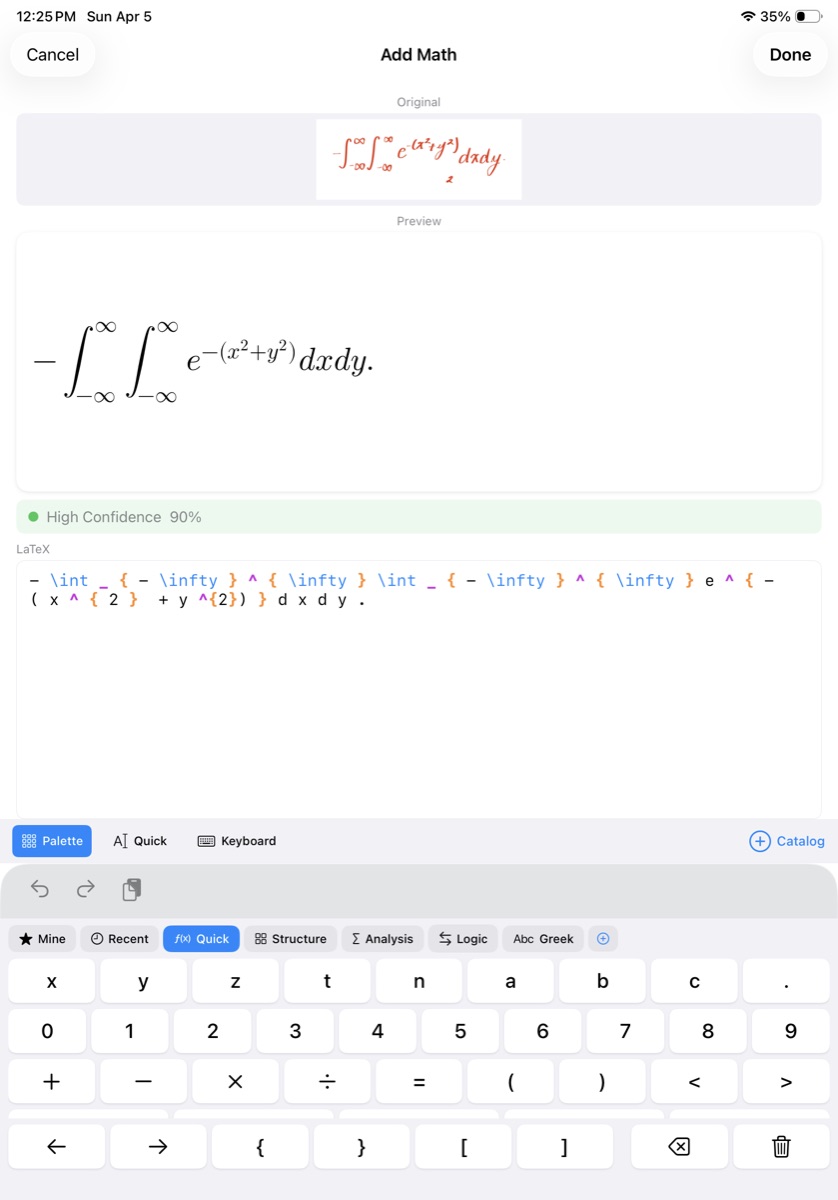
Scribble Math. Get LaTeX.
Draw any equation with Apple Pencil — integrals, matrices, summations, Greek letters, nested fractions — and Axiomika's AI recognizes it in under two seconds. The result is clean, editable LaTeX you can tweak, resize, and export. No typing LaTeX by hand. No memorizing commands. Just write naturally and let the app do the rest.
Three recognition modes let you trade speed for accuracy: Fast for quick captures, Balanced for everyday use, and Accurate with beam search when every symbol matters. Fine-tune beam count, length penalty, and max token output if you want full control. Everything runs on-device — no internet needed, no data uploaded anywhere.
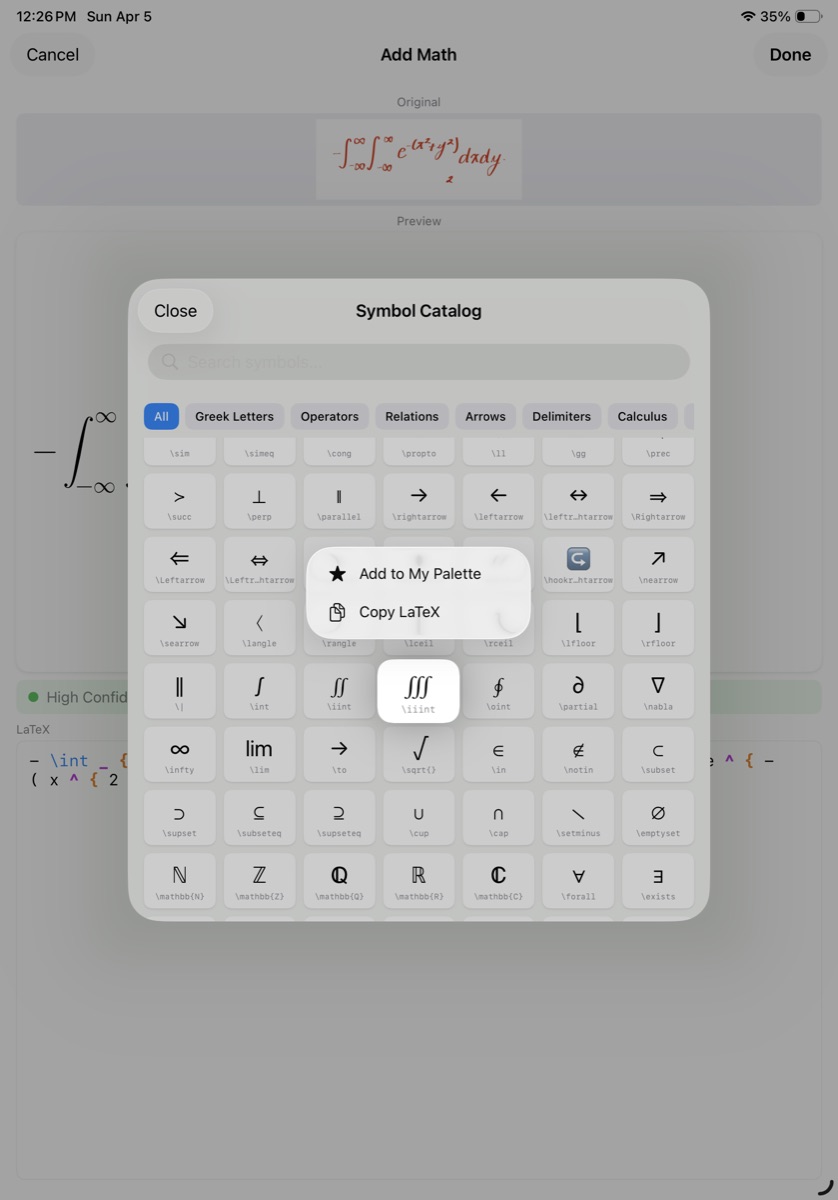
450+ Symbols. Zero Guesswork.
Sometimes you know exactly what symbol you need. The math keyboard organizes everything into palettes you can flip through: Quick for everyday operators, Structure for fractions and matrices, Analysis for integrals and limits, Logic for set theory, and Greek for the full alphabet.
Use the searchable catalog to find any of 450+ LaTeX symbols by name or code — tap to insert. Pin your most-used symbols to a personal "My Palette" for instant access. A live preview renders your formula as you build it so you always see exactly what you're creating before placing it on the page.
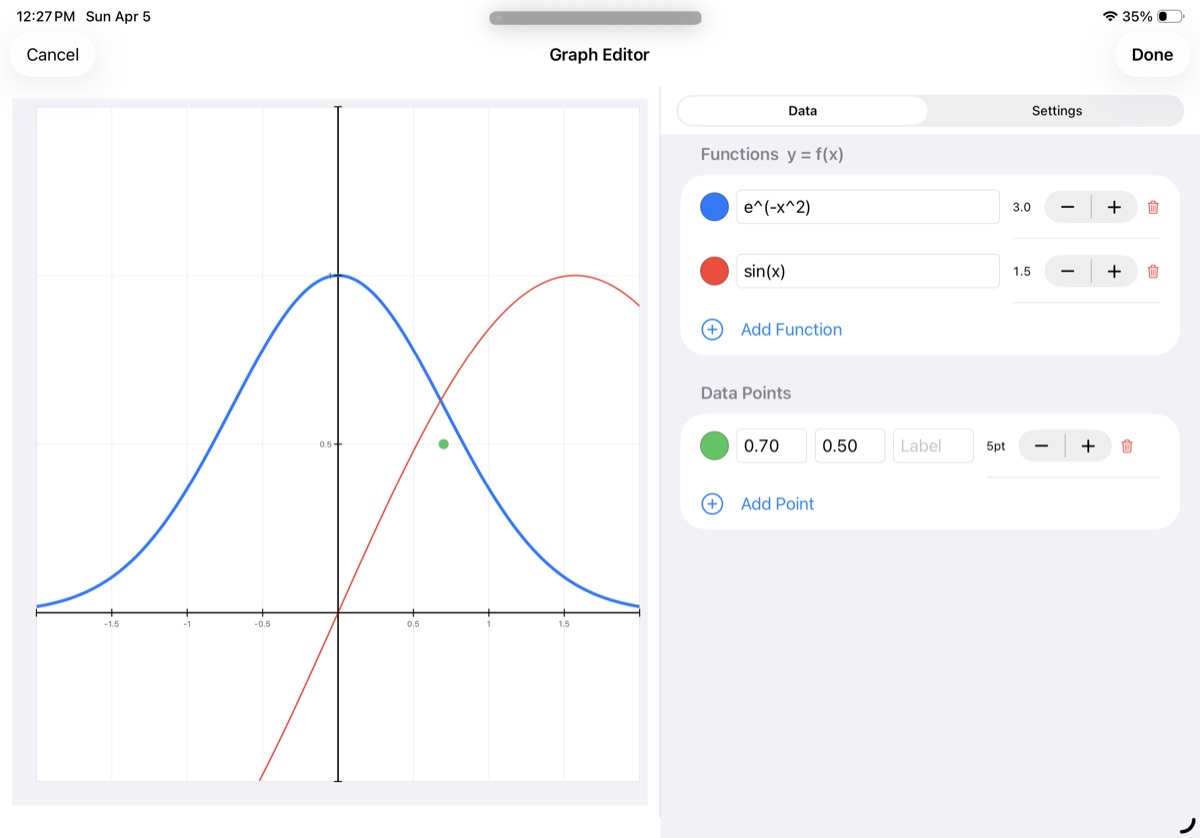
Plot Functions Right in Your Notes
Drop a graph onto any page and start plotting. Axiomika's built-in expression parser handles everything you'd expect — sin, cos, tan, log, ln, exp, sqrt, abs, and powers — plus implicit multiplication so you can type 2x or 2sin(x) naturally.
Layer multiple function curves with different colors and line widths. Add labeled data points as scatter plots. Customize axis ranges, tick spacing, grid lines, axis titles, and choose between boxed or open axes. The graph updates in real time as you tweak settings, with a live side-by-side preview on wider screens. Tap twice for a quick default graph, or drag to set the exact size and position.
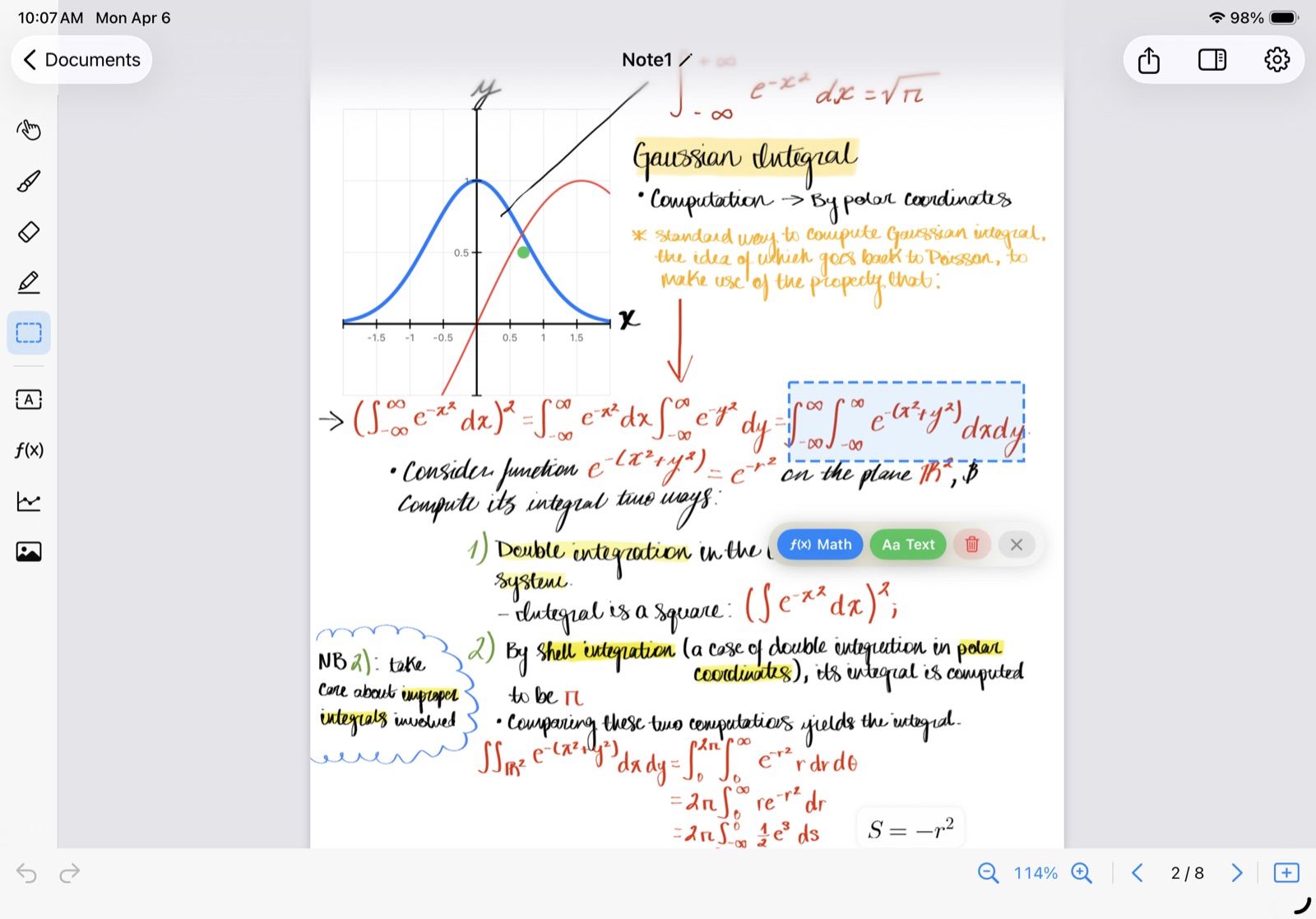
Tools Made for Technical Notes
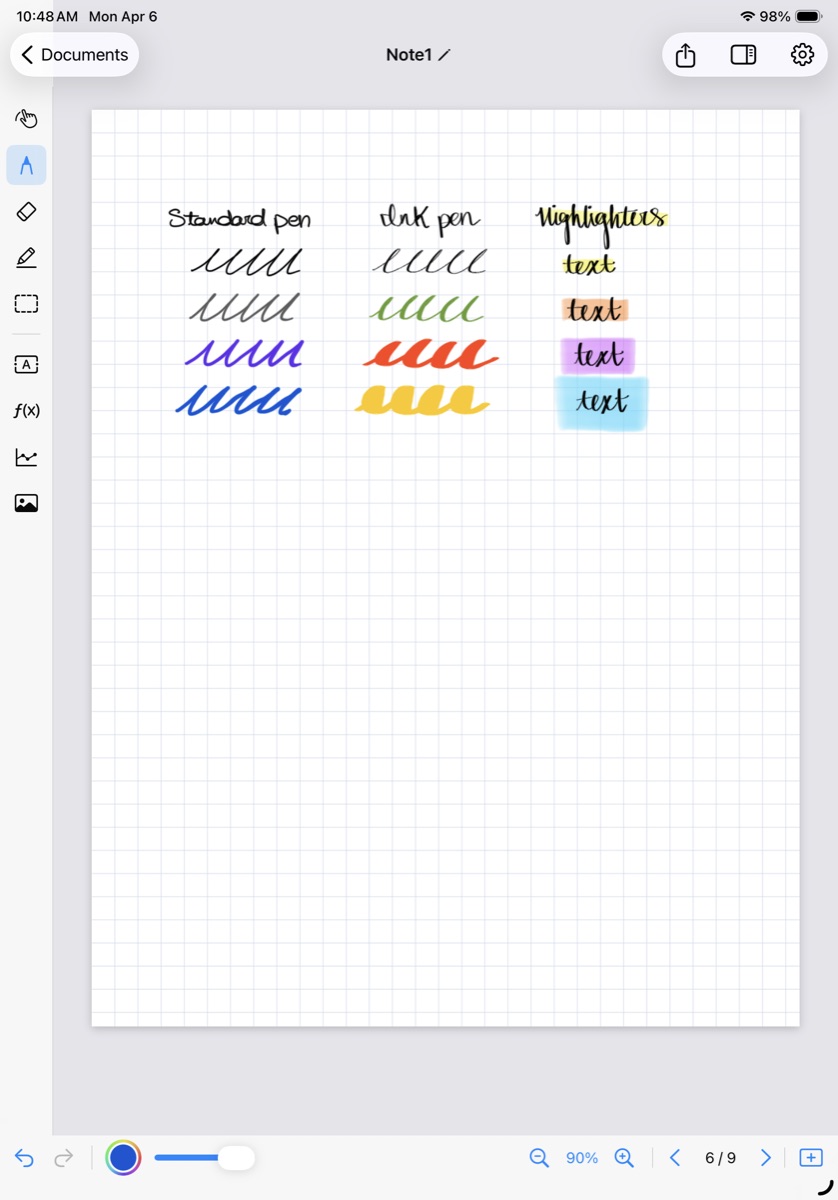
The pen tool gives you two modes — Standard for clean lines and Ink for a smoother fountain-pen feel — with adjustable color and width. The highlighter adds translucent emphasis in any color. The eraser removes strokes cleanly.
Select any handwritten content with a rectangle or freehand lasso, then choose what to do: recognize it as math (instant LaTeX), recognize it as text, or delete it. Every tool responds to Apple Pencil pressure. Zoom from 50% to 300% and navigate with pinch and pan. Undo and redo track both your drawings and object changes in one unified history.
Five Layers. One Page. Total Control.
Every page is a smart stack of layers working together.
Template
Blank, lined, or graph paper as your base
PDF Background
Import and annotate over textbook pages
Ink Layer
Draw with Apple Pencil freely
Objects
Formulas, text, graphs, and images
Composite
Everything renders as one seamless page
Each layer renders independently so you can toggle what shows up in your exports. It all composes into one seamless page that looks exactly how you want it.
PDF In. PDF Out. Done.
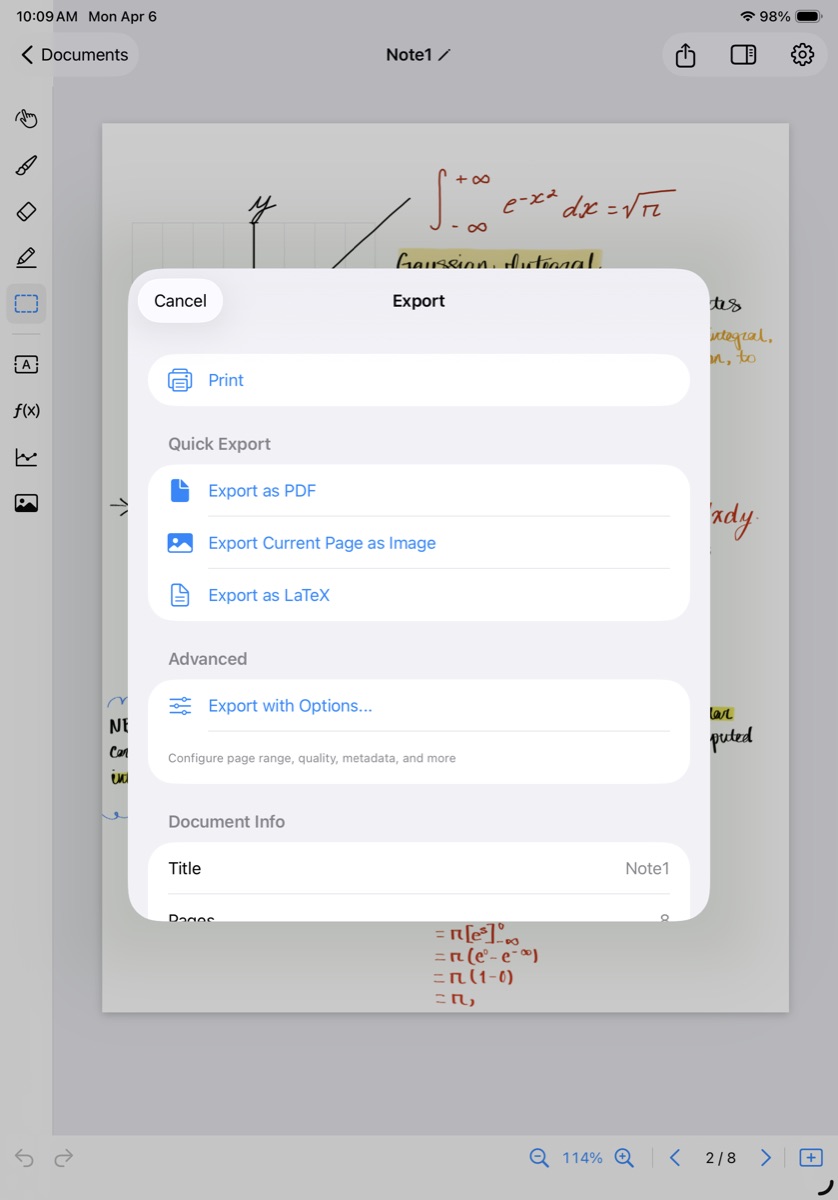
Import textbook pages, problem sets, or research papers as annotatable backgrounds — write your solutions directly on top. When it's time to turn in your work, export as PDF with three quality levels: Standard for sharing, Retina for screens, and Print for physical copies.
Pick specific pages or export everything. Choose which layers to include and add metadata like title and author. LaTeX formulas render at crisp, vector-level quality through the SwiftMath engine. Share via AirDrop, Mail, Messages, or any app on your iPad.
From Notes to Paper in One Tap
Export your entire document as a ready-to-compile .tex file. Axiomika generates a proper LaTeX document with the right preamble — amsmath, amssymb, pgfplots, geometry — along with inline math, text blocks, and embedded images.
Graphs convert to native PGFPlots code with all your function curves, data points, and axis settings preserved. Drawings export as high-res PNGs. Everything bundles into a ZIP you can open in Overleaf, TeXShop, or any LaTeX editor and compile immediately.
Everything Else You Need
Every Note, Right Where You Left It
The document browser shows your work as visual cards with thumbnails, titles, page counts, and last-modified dates. Create folders to organize by class, project, or semester. Search across all your documents in real time. Import PDFs directly from the browser.
Pick Up Where You Left Off
Axiomika syncs your documents across all your iPads through iCloud. Changes auto-save every two seconds and sync automatically — no manual uploads, no "save to cloud" buttons. A status indicator shows sync progress.
Add Pages. Reorder. Duplicate. Go.
A visual sidebar shows thumbnails of every page. Tap to jump. Long-press and drag to reorder. Right-click any page to duplicate it, copy it to another document, or delete it. Add new pages from blank, lined, or grid templates.
Bring In Diagrams and Figures
Insert any image from your photo library — diagrams, charts, screenshots, photos of whiteboards. Drag to position and resize right on the canvas. Draw over images with Apple Pencil, add math labels, or place data points on top.
Handwritten Text, Recognized Too
It's not just math. Select any handwritten text and convert it to editable, searchable plain text using Apple's Vision framework. Great for labels, annotations, or written explanations that live alongside your equations.
Start Fast. Go Deep When You're Ready.
A quick five-step tutorial walks you through everything — drawing tools, math recognition, graph creation, and export. When you're ready to optimize, dive into recognition settings: switch modes, adjust beam count, tweak length penalty, or just pick a preset.
Everything You Need.
One App. One Purchase.
Handwritten math recognition. Interactive graphing. PDF annotation. LaTeX export. iCloud sync. 450+ symbols. Apple Pencil optimized. All processing happens on your iPad — no subscriptions, no internet dependency. Just open the app and start working.
No account required. No subscription. No data collection.
Get in Touch
Have a question or feedback? We'd love to hear from you.